
Thesis Management Examination (TEM) HELP
Gateways and Enquiries | Restricted Access | Notification of Intention to Submit/Supervisor's Certificate | Nomination of Examiners | Examiner-related tasks | CONTACT US
WELCOME TO THE TEM HELP PAGES
The Thesis Examination Management (TEM) online system provides direct access to information on research thesis submission and examination. As a student, academic or administrative staff member you can carry out administrative tasks and monitor the progress of the examination of your thesis or that of your students.
These Help pages are divided into sections, each of which describes a different part of the thesis submission and examination process. Within each section there is a general description of the processes covered and a step-by-step guide for your role.
Gateways and Enquiries
In most cases you will have received an email prompting you to do a TEM-related task. This section of Help is designed to get you to the page where you carry out that task. The rest of the Help site can be accessed via the links at top and bottom of each Help page.
This section also describes how to get to an enquiry screen.
| Student |
| Supervisor |
| Postgraduate Co-ordinator |
| Faculty Executive |
| School Administrator |
Student
|

|
1. |
Log into myUNSW
|
| 2. |
On your Home tab go to the left-hand side channel, For Research Students, and click on Thesis Examination Management. From there you can access all thesis submission and examination functions. |
On this page you can...
- Apply to have access to your final thesis copy restricted once it gets to the library. Please note that you only need to apply for restricted access if there is a need that can be supported by justification and the approval of your Supervisor and the University.
- Submit a notification of intention to submit your thesis by clicking on the 'Submit Notification' button . After submission the label on this button changes to 'View Thesis notification' and allows you to review the form you lodged.
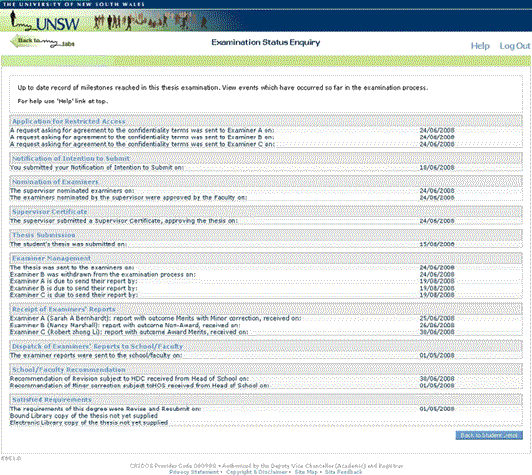
- View a summary page which shows the current status of your thesis examination by clicking on the 'Examination Status Enquiry' button. You will then be able to see at a glance all of the events which have been recorded so far regarding the examination of your thesis, see illustration below.
|

Supervisor
|

|
1. |
Log into myUNSW
|
| 2. |
Go to the Academic Admin tab. In the Student & Academic Admin channel on the left, click on Thesis Examination Management. This takes you to a list of the students whom you currently supervise. Note: You can also include students who have already satisfied the requirements for their degree by clicking in the checkbox marked 'Include students that have already completed their degree' and clicking the 'Refresh' button. |
|
3. |
Click on the 'Select' button next to the student's details. |
Options available to you include:
- 'Examiner Status Enquiry' - View a summary page showing the current status of the examination and all events which have occurred so far.
- 'Restricted Access Application' - Record a decision regarding approval for a student's application.
- 'Supervisor's Certificate' - Record whether a student's thesis is in a form suitable for submission (this replaces the old, printed Supervisor's Certificate form).
- 'Examiner Nomination Management' - Nominate examiners for a student.
Postgraduate Co-ordinator
|
| 1. | Login to myUNSW |
| 2. |
Go to the Academic Admin tab. In the Student & Academic Admin channel on the left, click on Thesis Examination Management. You have 2 options: |
| 3. | Click on the 'Select' button next to the student's details. |
Student Thesis Management
To find a particular student:
| 1. |
Use the selection criteria to narrow down your search. Every time you change the search criteria, click the 'Refresh' button to bring up a new list. The default display is all current students. You can include students who have satisfied requirements for their degree or restrict the search to students who have already submitted their thesis. Please note that this will only return students who have submitted their thesis since the Thesis Examination Management system came online. |
| 2. | Click on the 'Select' button next to the student's name. You will then be taken to a menu page which will allow you to carry out a number of tasks: |
- 'Examination Status Enquiry' - View a summary page showing the current status of the examination and all events which have occurred so far.
- 'Examiner Status Enquiry' - View the current status of the nomination and approval of a set of examiners for a student.
- 'Examiner Nomination Management' - Approve a set of examiners for a student.
Examiner Management
Go to Examiner-related Tasks.
Faculty Executive
|
|
1. |
Log into myUNSW |
| 2. |
Go to the Academic Admin tab. In the Student & Academic Admin channel on the left, click on Thesis Examination Management. You have 2 options: - Choose Student Thesis Management (see below) to carry out tasks related to a specific student, including the nomination of a set of examiners for that student. - Choose Examiner Management (see below) to find an examiner and carry out tasks which relate to that examiner alone. |
| 3. |
Click on the 'Select' button next to the student's details. |
Student Thesis Management
To find a particular student:
| 1. |
Use the selection criteria to narrow down your search. Every time you change the search criteria, click the 'Refresh' button to bring up a new list. The default display is all current students. You can include students who have satisfied requirements for their degree or restrict the search to students who have already submitted their thesis. Please note that this will only return students who have submitted their thesis since the Thesis Examination Management system came online. |
| 2. | Click on the 'Select' button next to the student's name. You will then be taken to a menu page which will allow you to carry out a number of tasks: |
- 'Examination Status Enquiry' - View a summary page showing the current status of the examination and all events which have occurred so far.
- 'Examiner Status Enquiry' - View the current status of the nomination and approval of a set of examiners for a student.
- 'Examiner Nomination Management' - Approve a set of examiners for a student.
Examiner Management
Go to Examiner-related Tasks.
School Administrator
|
|
1. |
Log into myUNSW |
| 2. |
Go to the Academic Admin tab. In the Student & Academic Admin channel on the left, click on Thesis Examination Management. You have 2 options: - Choose Student Thesis Management (see below) to carry out tasks related to a specific student, including the nomination of a set of examiners for that student. - Choose Examiner Management (see below) to find an examiner and carry out tasks which relate to that examiner alone. |
| 3. |
Click on the 'Select' button next to the student's details. |
Student Thesis Management
To find a particular student:
| 1. |
Use the selection criteria to narrow down your search. Every time you change the search criteria, click the 'Refresh' button to bring up a new list. The default display is all current students. You can include students who have satisfied requirements for their degree or restrict the search to students who have already submitted their thesis. Please note that this will only return students who have submitted their thesis since the Thesis Examination Management system came online. |
| 2. | Click on the 'Select' button next to the student's name. You will then be taken to a menu page which will allow you to carry out a number of tasks: |
- 'Examination Status Enquiry' - View a summary page showing the current status of the examination and all events which have occurred so far.
- 'Examiner Status Enquiry' - View the current status of the nomination and approval of a set of examiners for a student.
- 'Examiner Nomination Management' - Approve a set of examiners for a student.
Examiner Management
Go to Examiner-related Tasks.
Gateways and Enquiries | Restricted Access | Notification of Intention to Submit/Supervisor's Certificate | Nomination of Examiners | Examiner-related tasks | CONTACT US